App for Shopify

Five couriers. One app. Zero manual work.

Dostavi.bg takes the grunt work out of deliveries — prices, addresses and waybills — so you can focus on growth. Econt, Speedy, BoxNow, Pigeon and Sameday in one app.

  • Econt
  • Speedy
  • BoxNow
  • Pigeon Express
  • Sameday

Free plan · 14-day trial on paid plans · No theme edits

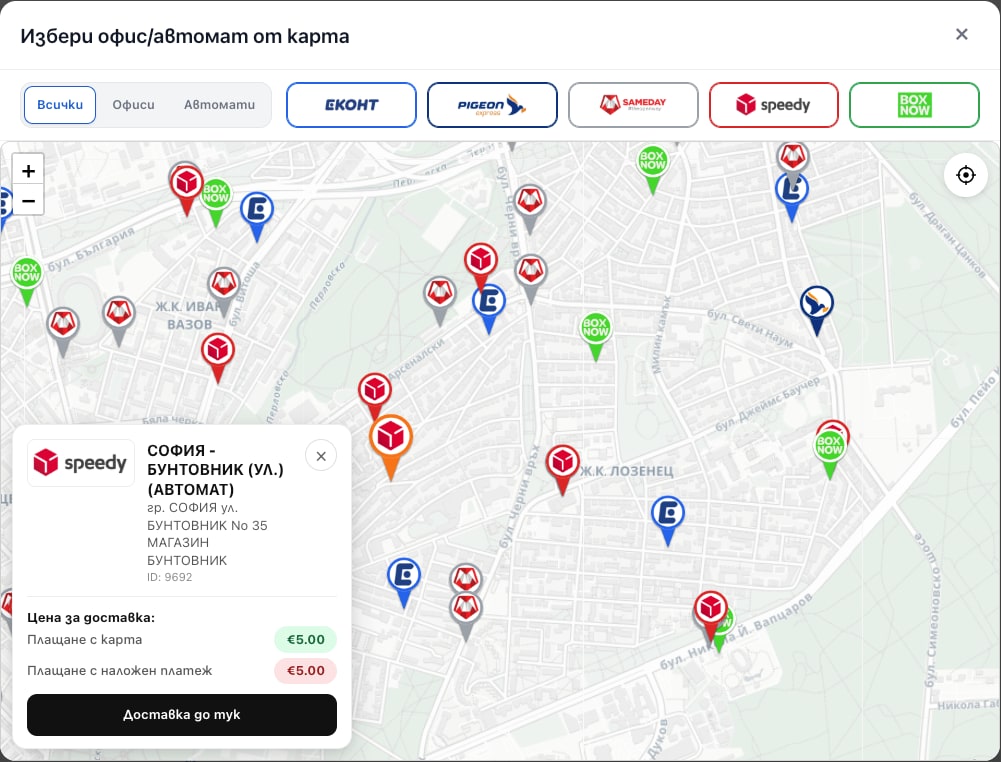
Map with Econt, Speedy and BoxNow offices and lockers, a selected point and its delivery price
The map: every office and locker, with the price at each point
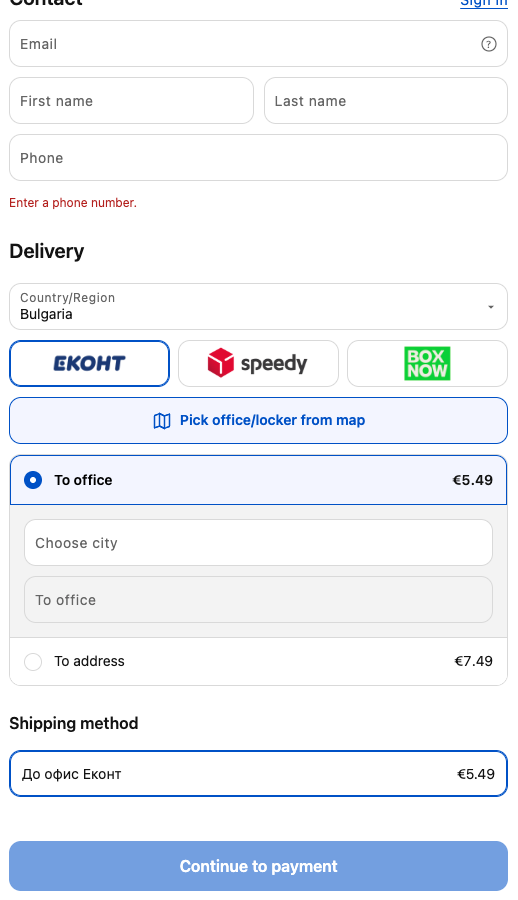
Courier and delivery-type picker in the checkout of a Shopify store using Dostavi.bg
The picker, built into checkout
The problem

Five couriers. Five apps. Five different logics.

Every Bulgarian courier has its own Shopify app. Install two and the trouble starts — because each of them wants to manage the same shipping methods.

The apps get in each other’s way

One for Econt, another for Speedy, a third for BoxNow. Each with a different interface, different settings and a different look for the customer. And because they all write to the same shipping methods, the customer sees duplicated methods, vanished methods or a wrong price — and you have no idea which app did it.

You retype every order by hand

Open the order, open the courier’s site, copy name, phone, office. Three minutes per order. At 40 orders a day that’s two hours every day, just copying.

The customer describes the office in words

“Econt, the office in Lyulin, the one next to Billa.” You call to clarify, get the office wrong, the parcel comes back — and you pay shipping both ways for nothing.

Delivery prices are a guess

You charge €2.99 for all of Bulgaria because you have no way of knowing the real price. On heavy and remote parcels you pay the difference out of your margin; on light ones you look expensive and lose the order.

Cash on delivery is out of control

You can’t turn it off for a specific shipping method, nor stop it above a certain amount. And the same customer who already refused two parcels calmly orders a third — and you pay shipping both ways again.

A long checkout eats your ad budget

The customer has reached checkout — you’ve already paid for them. If they now have to dig through a dropdown of 400 offices or type an address as free text, some of them drop off. Every drop-off is a paid click that didn’t come back — and ROAS falls without you touching the ads.

Waybills — one at a time

The evening before the courier comes, you sit down and click number by number instead of selling.

One app. Five couriers. One logic. And it’s easy to set up.

Install for free
Two modes

Choose how the customer picks delivery

Dostavi.bg works in two different modes. Turn on the one that fits your store — or test which one sells better.

Mode 1 · Pre-checkout

A form with a map, before checkout

The customer picks a courier, then a delivery type — office, locker or address — and finally a specific point on an interactive map. All of it before entering checkout.

  • Couriers appear as logos, not as rows in a dropdown
  • The map shows every office and locker at once, colour-coded by courier
  • The price is shown on the point itself — separately for card and for cash on delivery
  • The address enters the order structured, not as free text
Dostavi.bg pre-checkout mode: a map of Econt, Speedy and BoxNow offices and lockers with delivery prices
Choosing a courier and delivery type — office, locker or address — before checkout with Dostavi.bg
Mode 2 · Shopify Checkout

Methods in the standard checkout

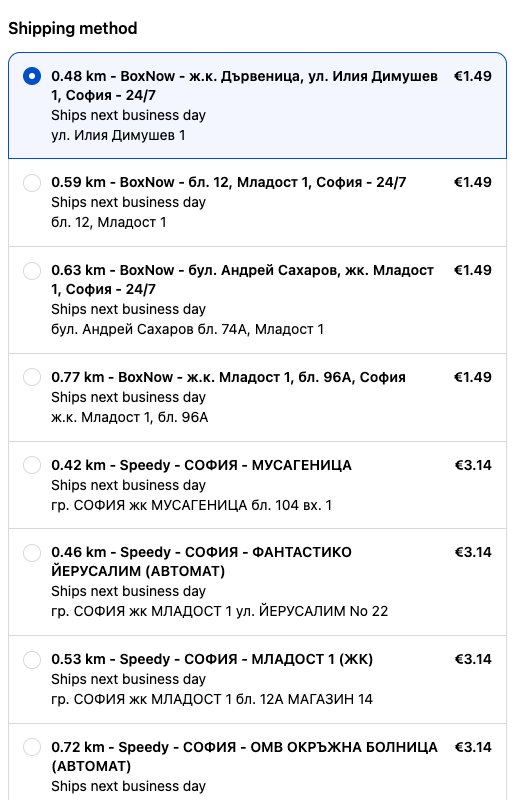
No extra form at all. The customer enters their address in the standard Shopify checkout and sees the shipping methods sorted by distance from them.

  • The nearest offices and lockers come first, with the distance next to each
  • Several couriers in one list, with their real prices
  • Everything happens in the familiar Shopify interface — zero friction
  • Ideal for stores that don’t want an extra step before payment
BoxNow and Speedy shipping methods in Shopify Checkout, sorted by distance to the customer’s address

Both modes work with two kinds of prices

You choose where the delivery price comes from — and you can switch at any time without changing the mode.

Mapped Shopify methodsUse the shipping methods you’ve already set up in your store, with your fixed prices.Real prices from the courierThe price is pulled from the courier at the moment of the order — by weight, zone and cash on delivery.
The effect

A faster checkout is a better ROAS — without touching your ads

Your ad budget gets the person to checkout. Everything that happens from there decides whether you paid for an order or for nothing. Dostavi.bg shrinks the delivery choice from “dig and type” to two or three taps.

Same traffic, same budget, fewer people lost at the last step.

1

You pay for a click → the customer reaches checkout

2

They have to choose where to receive the parcel — this is where it breaks

3

With Dostavi.bg: courier → type → office, in seconds

4

More completed orders from the same budget

Features

Everything about Bulgarian deliveries, inside Shopify

Connect your courier accounts once. From then on prices, addresses and waybills move on their own — and duplicate orders and cash on delivery are under control.

Pick a point on a map

Office, locker or address — with search and a map instead of a dropdown. The address enters the order machine-readable, with no phone calls and no wrong offices.

Real prices from the courier

Calculated in real time by weight, zone and cash on delivery — straight from the courier’s system. You stop paying the difference out of your margin.

Waybills in bulk

Select the orders and print all waybills at once. The tracking number is written back to the order and fulfilment is synced.

Works with your shipping setup

Uses the methods and zones already defined in your store. You keep control over names and fixed prices instead of starting from scratch.

Cash on delivery under control

Turn cash on delivery on or off for a specific method, and hide it entirely above a chosen order amount.

Real-time tracking

Shipment statuses update automatically and the customer gets a tracking number. Store pickup is supported too.

Duplicate orders don’t slip through

When the same customer places the same order twice — out of impatience, a page reload or on purpose — the app detects and flags them. You see it before you process the orders and ship two parcels.

Blacklist for cash on delivery

You decide which customer is a bad actor — the one who orders and then doesn’t pick up the phone or refuses the parcel. Add them to the blacklist and from then on the app takes care of it: on their next order, cash on delivery simply isn’t offered. They can buy, but only prepaid.

Couriers

The five couriers Bulgaria sells with

The integration covers delivery within Bulgaria to an office, a locker and an address. You use your own contract and your negotiated prices — Dostavi.bg only connects your courier account to Shopify.

CourierTo officeTo lockerTo addressCash on delivery
EcontEcontYesYesYesYes
SpeedySpeedyYesYesYesYes
BoxNowBoxNowYesYes
Pigeon ExpressPigeon ExpressYesYesYesYes
SamedaySamedayYesYesYesYes

Dostavi.bg is a Shopify app that connects an online store in Bulgaria with the five major couriers — Econt, Speedy, BoxNow, Pigeon Express and Sameday. It lets the customer choose an office, locker or address on a map before paying, pulls the real delivery price from the courier and generates the waybills inside Shopify. It is developed by AdFeed Studio and distributed through the Shopify App Store with a free plan.

Econt

Delivery to office, to locker and to address, with cash on delivery. The customer picks the exact office on the map or from the list in checkout, and you print the Econt waybill straight from Shopify.

Speedy

Delivery to office, to locker and to address, with cash on delivery. The Speedy integration pulls the price in real time by weight and zone, and waybills are generated in bulk.

BoxNow

Lockers with 24/7 access, with cash on delivery. The customer sees the nearest BoxNow lockers — on a map or sorted by distance in Shopify Checkout.

Pigeon Express

Delivery to office, to locker and to address, with cash on delivery. Pigeon Express works with your contract and your prices, like every other courier in the app.

Sameday

Delivery to office, to locker and to address, with cash on delivery. Sameday lockers appear in the same list as the other couriers, without a separate app.

One or all five

You don’t have to turn on all of them. Enable only the couriers you work with — and when you add a new one, you don’t install a new app or touch the settings of the old ones.

How it works

From install to the first waybill

Step 01

Install the app

One click from the Shopify App Store. No theme edits, no code.

Step 02

Connect your couriers

Enter the credentials for your courier account and choose the mode and the methods.

Step 03

Go live and print

Customers choose where to receive the parcel, and you generate the waybills in bulk.

Pricing

Plans that grow with the store

Start for free. Paid plans have a 14-day trial — you only pay if you decide to stay.

Free

$0

forever

No time limit, no cardStart for free
  • 1 active courier of your choice
  • 50 waybills a month
  • Both modes — pre-checkout and Shopify Checkout
  • Fixed delivery prices
  • Cash on delivery per shipping method
  • Bulk waybill printing
  • Store pickup
  • Threshold for hiding cash on delivery
Most popular

Light

$15

per month

14 days freeTry 14 days free
  • 2 active couriers of your choice
  • Unlimited waybills
  • Both modes — pre-checkout and Shopify Checkout
  • Fixed delivery prices
  • Cash on delivery per shipping method
  • Bulk waybill printing
  • Store pickup
  • Threshold for hiding cash on delivery

Premium

$35

per month

14 days freeTry 14 days free
  • Unlimited couriers
  • Unlimited waybills
  • Both modes — pre-checkout and Shopify Checkout
  • Dynamic + fixed delivery prices
  • Cash on delivery per shipping method
  • Bulk waybill printing
  • Store pickup
  • Threshold for hiding cash on delivery

Development stores use everything for free. If you’re an agency or a developer, you can test Dostavi.bg on a development store with no subscription and no trial period — with all couriers and no limits.

Light and Premium start with a 14-day free trial — billing begins after it and you can cancel at any time. The subscription is billed by Shopify in US dollars and renews every 30 days. The app price does not include the cost of the deliveries themselves — those are invoiced by the courier under your contract.

FAQ

Frequently asked questions

Which couriers does Dostavi.bg work with?

All five major Bulgarian couriers — Econt, Speedy, BoxNow, Pigeon Express and Sameday. You can enable one or all of them at once, depending on your plan.

How do I connect Econt or Speedy to Shopify?

Install Dostavi.bg from the Shopify App Store and enter the credentials for your courier account. The integration with Econt, Speedy, BoxNow, Pigeon Express and Sameday goes through one app and one setup — no theme code is touched and no developer is needed.

What’s the difference between the two modes?

In pre-checkout mode the customer picks a courier, a delivery type and a specific office or locker on an interactive map before entering checkout. In Shopify Checkout mode the methods are shown in the standard Shopify checkout, sorted by distance to the entered address. Both modes work with mapped Shopify shipping methods as well as with real-time prices from the courier.

Won’t it clash with the other courier apps?

That’s exactly why Dostavi.bg exists. Instead of a separate app per courier — all competing for the same shipping methods and showing duplicated or vanishing options — all five couriers go through one logic and one setup.

Do I need my own contract with the courier?

Yes. Dostavi.bg connects your existing courier account to Shopify, so you keep your negotiated prices and terms. The app is not an intermediary and does not buy waybills on your behalf.

Does it work with cash on delivery?

Yes. You can turn cash on delivery on or off for a specific shipping method. On paid plans you can also set a threshold above which cash on delivery is hidden automatically.

What does the app do about bad-actor customers?

Two things. First, it automatically detects duplicate orders from the same customer and flags them, so you don’t ship two parcels for one order. Second, you can add a customer to a cash-on-delivery blacklist — on their next order the app won’t offer cash on delivery, so they can only buy prepaid.

How much does the app cost?

There’s a free plan with one courier and up to 50 waybills a month, with no time limit and no card. Light is 15 USD a month for two couriers and unlimited waybills. Premium is 35 USD a month for unlimited couriers and dynamic prices. Both paid plans start with a 14-day free trial. Yearly billing saves 17%.

Can I test before I pay?

Yes, in three ways. The free plan has no time limit and requires no card. Light and Premium start with a 14-day free trial — billing begins after it and you can cancel at any time. And if you’re an agency or a developer, all plans are free on a development store, with no subscription.

Will I lose my shipping setup in Shopify?

No. The app works with the shipping methods and zones already defined in your store, so you keep control over names and fixed prices.

Do I need to touch the theme code?

No. Installation is from the Shopify App Store and requires no theme edits or help from a developer.

What language is the app in?

The admin panel and the delivery picker are in Bulgarian and English.

Leave the grunt work to Dostavi.bg

Install for free, connect your first courier and issue your first waybill before the end of the day.

Free plan · 14-day trial on paid plans